

Jane app review 2026: every feature I use, and who it is right for
If you've spent any time in a therapist Facebook group lately, you've probably seen someone ask about Jane App and get ten different opinions in the comments. Jane is used by more than 250,000 practitioners, but a high user count doesn't automatically tell you whether it fits the way you run your practice.
I know how exhausting it is to research this stuff when you'd rather be doing anything else. You didn't go into this field because you love comparing pricing tiers. I've walked plenty of therapists through this exact decision inside The Launch Kit, my course for launching a private practice, because choosing the wrong system in month one is expensive to unwind later.
So instead of another vague pros and cons list, I'm going to open Jane up and walk you through it the way I'd show a friend on a screen share. Feature by feature, what it does, why I like it, and where I'd tell you to pause.
One honesty note before we start: I'm a Jane affiliate, so if you sign up through my links I may earn a small commission at no extra cost to you. That doesn't change what I'll tell you here. If Jane were the wrong fit for solo therapists, I'd say so, because finding the right system matters more to me than a referral.
What is the Jane app and who is it built for?
Jane is a practice management sfotware and EHR originally built with multi disciplinary and allied health clinics in mind. Think physical therapy, chiropractic, massage, and wellness practices that often run several practitioners out of one location. Mental health providers use it happily and in large numbers, but it's worth knowing that it wasn't designed exclusively around a solo therapist seeing individual clients for fifty minute sessions.
That origin story shows up in the product, mostly in good ways. Jane is unusually strong operationally: scheduling, charting, payments, and the front desk experience. It just means some of what you'll see, like room management or multi location toggling, is built for a practice bigger than yours might ever be. You can ignore those parts.
How I'm walking through Jane's features
Jane groups its features into three buckets, which is the most useful way to evaluate it. I'll spend most of our time on the first two, since those are what you'll touch daily as a solo therapist. The third exists mostly for clinics with staff and payroll, so I'll only flag the pieces that matter to a solo practice.
- Scheduling and booking: everything your clients touch before they ever see your face
- Charting and client care: notes, telehealth, intake, and messaging
- Clinic management and marketing: billing, payroll, reporting, and website tools
Scheduling and booking: the part your clients experience
This is where Jane shines brightest for me, and it's the part most therapists underestimate. Your scheduling system is the first real interaction a potential client has with your practice. If it feels clunky at 11 p.m. when they finally work up the nerve to book, that hesitation costs you a client you never knew about.
Online booking
Jane's online booking gives you a branded booking page, with your own logo and colors, where clients see real time availability and book themselves without a single back and forth email. You share the link on your site and social channels, and it stays accurate because it's pulling from your actual schedule.
What I love is how much control you keep. You decide which treatments, times, locations, and practitioners are bookable online at all, and options like staggered start times and rolling availability keep your day from getting chopped into unusable fragments. You can also sync your personal calendar, so a dentist appointment on Thursday doesn't turn into a double booking.
A few pieces here quietly protect your income:
- Automatic confirmations and reminders by email or SMS, so you're not the one texting reminders at 8 a.m. between sessions
- Waitlist alerts that notify clients when a spot opens up, which turns a Tuesday cancellation into a filled slot instead of an unpaid hour
- Deposits or full payment collected securely at the time of booking
- Cancellation windows and fees you set once, so your policy enforces itself instead of requiring an awkward conversation
- Intake and consent forms sent automatically with the booking confirmation
The calendar itself
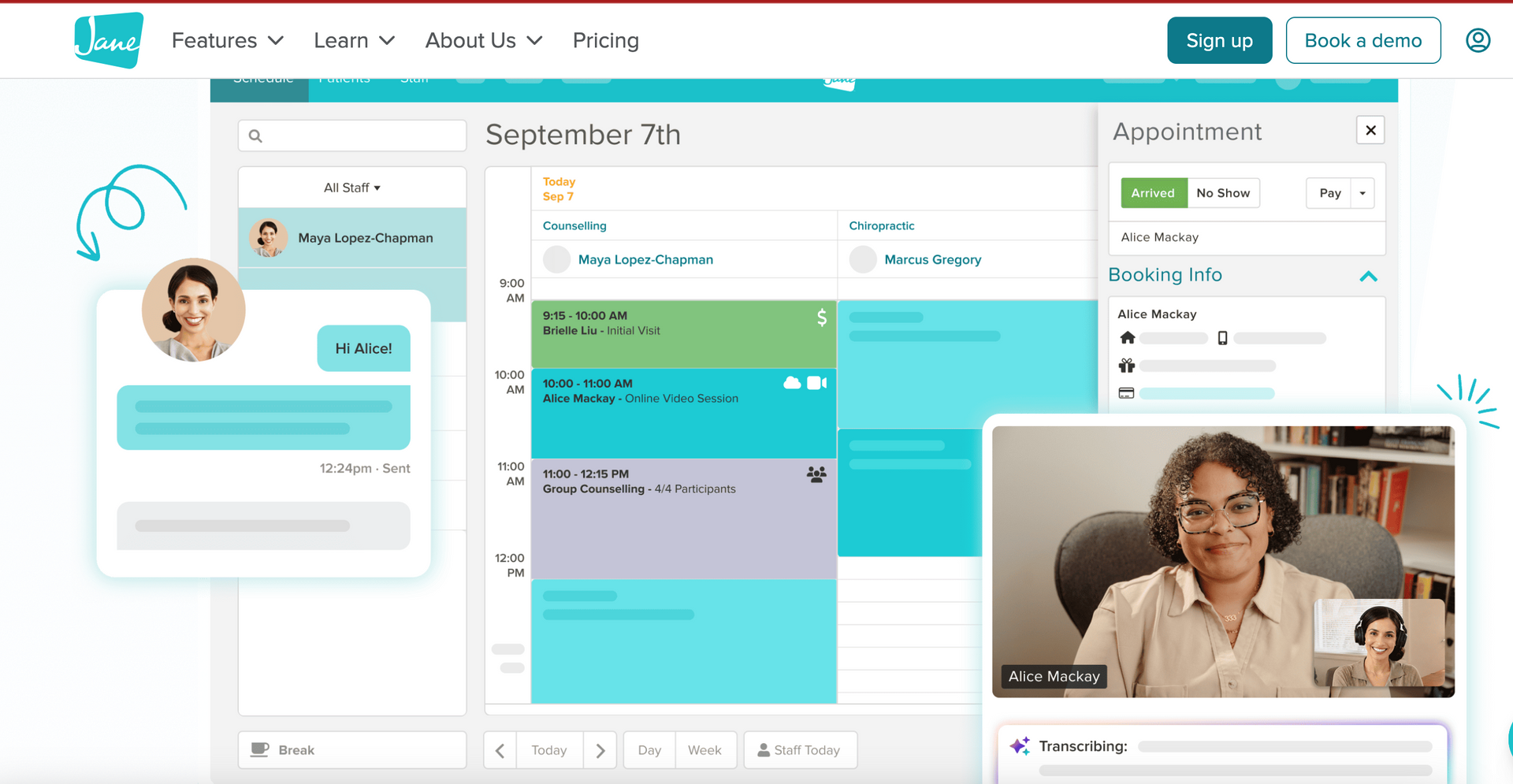
Jane's scheduling calendar is the thing you'll stare at more than anything else in the platform, and it holds up. Appointments are color coded with status indicators, you can see appointment details and notes right from the calendar, and rescheduling is drag and drop.
The small efficiencies add up. Availability suggestions and time slot highlighting mean you're not hunting for an opening, and patient search and keyboard shortcuts save you from clicking through four screens. You manage your working hours, breaks, and vacation time in the same place, which matters when the boundary you set in January is the one you'll be tempted to break in March.
Three details that stood out to me as specifically useful for therapists:
- Privacy Mode hides client names on your schedule and client list, which is worth turning on if you ever have your laptop open in a shared space
- Group and class scheduling is built in, so couples, family sessions, and therapy groups aren't a workaround
- No show history and outstanding balances are visible before check in, along with internal notes that carry forward between visits
Virtual assistants and receptionists
This one surprised me, and it's worth knowing about even if you don't need it yet. Jane has a team of real people, ready to help with your admin needs. You can hire clinic trained virtual assistants in your time zone to handle day to day admin, payments, and document management, or virtual receptionists who answer inbound calls and handle bookings, cancellations, rescheduling, and basic questions in real time.
Separately from the paid services, Jane lets you customize staff permissions, so an assistant you hire directly can manage your schedule and billing without access to clinical notes.
The Jane for Clients mobile app
Jane has a client facing mobile app for the U.S. and Canada, which answers one of the older complaints about the platform. Clients get one secure login across every Jane clinic they see, and from there they can rebook in a few taps, join a waitlist when their preferred time isn't available, read and reply to messages in one thread, and join online sessions in app. It carries your logo and practitioner profile, so it still feels like your practice.
Worth setting expectations: your side of Jane still runs in a browser rather than a dedicated practitioner app. On a laptop that's a non issue, and honestly I prefer writing notes on a real keyboard anyway. If you're someone who charts from your phone between sessions, test that workflow during your trial before you commit.
Charting and client care: where Jane earns its keep
If scheduling is what your clients feel, charting is what your nervous system feels. This is the bucket that decides whether you're finishing notes before you leave the office or carrying them into Sunday night.
Clinical documentation
Jane's charting is deeply customizable, which is the single most common reason therapists tell me they stayed. You can build your own chart format, use standard SOAP notes, or pull from a community library of more than a thousand templates and edit from there. If you've spent years refining your own progress note format, you're not being forced into someone else's boxes.
What saves time day to day is the smaller stuff: saved phrases and smart fields so you're not retyping the same sentence for the hundredth time, plus the ability to duplicate or pin a previous entry. Every note adds to a full care history you can see at each visit, so context doesn't get lost when you pick a client back up after a break.
A few things worth knowing on the compliance side, since this is the part nobody thinks about until they need it:
- Supervision workflows for reviewing, giving feedback on, and co signing notes, which matters if you're pre licensed or you supervise
- Audit trails with timestamps and signatures
- Permission based privacy settings that control who sees what
- HIPAA and PIPEDA compliance built in
- For U.S. clinics, CPT and diagnosis codes can be added right in the chart and carry through to the claim, so you're not entering the same thing twice
The AI scribe
Jane's AI Scribe is optional, and I want to lead with that. If you never turn it on, Jane works exactly the same. If you do, you can record a session or dictate your findings, and it drafts a formatted note that you review, edit, and sign. It works inside your existing templates rather than forcing a different format, and it's currently available to clinics in the U.S., Canada, and the U.K.
The detail I'd want to know as a therapist: you choose whether recordings are stored securely or permanently deleted. The feature is built to be HIPAA, PIPEDA, and GDPR compliant.
This is the feature therapists have the strongest feelings about, in both directions. If documentation keeps you at your desk two hours after your last client, it can hand back a real piece of your evening. If recording a session doesn't sit right with you clinically, don't use it. Either way, get informed consent in writing and check where your licensing board stands first.
Telehealth
Telehealth is built into Jane rather than living in a separate tool you're paying for and syncing. One to one telehealth is included with your Jane account at no extra cost, which is a bigger deal than it sounds when you price out a standalone video platform on top of your EHR.
It connects automatically to your scheduling, charting, and billing, and it supports individual, couple, and family or group sessions with up to fifteen participants. Sessions are encrypted and compliant with HIPAA, PIPEDA, and GDPR.
Intake forms
Intake forms go out automatically at the time of booking, and they collect health history, consent, insurance details, and even payment method before the first session. Everything saves straight to the client's chart with no manual entry on your end, and the templates are customizable rather than one generic form for every discipline.
Set this up properly and it removes an entire category of first session friction. Nobody's scribbling on a clipboard while their session clock runs, and you walk in already knowing what you're working with. If you're building your paperwork from scratch, slow down on this one and get it right. You'll use it with every client for years.
Secure messaging
Secure messaging gives you a compliant way to answer the "can we move Thursday" message without handing out your personal cell number or replying from regular email. It's fully encrypted and HIPAA, PIPEDA, and GDPR compliant, with read receipts that show when a message has actually been opened, and clients access it through the secure portal or the mobile app.
Integrations
Jane connects to a range of outside tools, and the integrations page is worth a scan before you decide. Calendar syncing, bookkeeping, email marketing, and insurance clearinghouses are the categories most solo therapists ask me about. Check the specific tools you already pay for rather than assuming, because "it integrates" means very different things depending on which tool you mean.
Clinic management and marketing: the parts a solo practice actually uses
Jane's third bucket covers billing, payroll, reporting, and marketing tools. Most of it is built for multi practitioner clinics, so rather than walk you through all of it, I'm only flagging the pieces that matter when you're the only clinician in the practice.
- Jane Payments handles card processing and stored cards, which is what makes late cancellation and no show fees something you can actually enforce.
- Billing and insurance covers superbills and claims, and connects to the codes you entered in the chart. If insurance is a meaningful part of your caseload, read this page closely and ask Jane directly how claims submission works in your state before you commit.
- Invoicing and receipts keeps client payment records tidy, which your accountant will thank you for in April.
The rest is genuinely built for clinics, and you can skim it: packages and memberships, payroll for paying associate clinicians, reporting and analytics, and Jane's marketing tools including websites, SEO, and ratings and reviews.
One note on that last group, since I get asked: if you already have a website you like, don't let a bundled site builder pull you into rebuilding. Your site shouldn't be tied to whichever EHR you're using this year.
How much does the Jane app cost?
Jane's pricing depends on your plan and how many practitioners you have, and it lands in a similar range to other practice management platforms. Rather than quote a number that could be outdated by the time you read this, check Jane's current pricing page directly.
What matters more than the sticker price is whether your tier includes what you'll actually use. I've watched therapists sign up for a base plan, then discover in month four that something they wanted lives a tier up. Worth noting on the other side: one to one telehealth is included, so if you're paying separately for video right now, factor that back into the comparison.
Where this fits into your bigger startup budget
Your EHR is one line on a much longer list: liability insurance, a website, directory listings, maybe office rent. Software is rarely the expense that surprises therapists in year one. It's everything stacked on top of it. I break down every category in my full breakdown of private practice opening costs, so this decision doesn't get made in a vacuum.
Is the Jane app worth it for a solo private practice?
Here's my honest answer: it comes down to how much you care about customizing your documentation, and how much of your caseload runs through insurance.
When Jane is a great fit
- You want real control over your chart templates instead of a one size fits all note
- You do couples, family, or group work and want that supported natively rather than as a workaround
- You want telehealth, scheduling, intake, messaging, and payments in one place instead of four subscriptions
- You can picture yourself adding an assistant or an associate in the next few years and don't want to migrate again
When I'd tell you to look elsewhere
- Insurance is the majority of your caseload and you haven't confirmed that Jane's claims workflow fits your state and your payers
- You genuinely need to run your whole practice from your phone
- You want minimal setup, and Jane's customization would be one more thing to configure when you're already overwhelmed
That first point deserves its own beat, because insurance gets tangled up with credentialing in a way that confuses people. Whether or not you're paneled is a separate decision from which software you use, and it's worth untangling before you evaluate any EHR. I walk through what credentialing actually involves in my complete guide to insurance credentialing for therapists.
How to test Jane in one real week
Use the trial deliberately instead of clicking around the dashboard for twenty minutes and calling it research. Here's the week I'd run:
- Build one real appointment type, with your actual length and fee, and book yourself into it through the online booking page
- Send yourself an intake form as if you were a new client, and fill it out on your phone
- Write one full progress note in your own template, start to finish
- Run a mock telehealth session with a friend or colleague
- Create one invoice and one receipt
If all five feel smooth, you have your answer. If one of them makes you groan, that's a workflow you'd be groaning about every week for years, and it's much cheaper to learn that now than after you've moved client records.
What makes this decision feel less overwhelming
If you've read this whole review and still feel unsure, that isn't a sign you're bad at business decisions. Nobody ever taught you how to evaluate practice software against your own workflow. That's a gap in our training, not a personal failing.
You don't need this figured out perfectly before you start. You need a clear way to think through what matters for your practice, which usually starts with getting specific about who you actually serve. That's part of what I help with in my niche finding guide for therapists, because the systems that support your practice work best when they're built around a real caseload.
I've watched therapists spend six months bouncing between platforms because they never mapped their workflow first. That's time and money that could have gone toward filling their caseload. If you'd rather build a practice that runs smoothly than one held together with sticky notes and guesswork: you can start using the Jane app here.

Hey there, I’m Alicia Murray
A licensed therapist, multi-six-figure group practice owner, mom of 2, and the founder of Therapist HQ.